Authentication
The EPMware REST API uses token-based authentication to secure API endpoints. This page explains how to generate, use, and manage authentication tokens.
Overview
All REST API calls require authentication using a token that must be included in the request header. This token identifies and authorizes the user making the API call.
Security Best Practice
Treat API tokens like passwords. Never share tokens, commit them to version control, or expose them in client-side code.
Generating a Token
Step-by-Step Token Generation
- Log into EPMware application
- Click on the Security Module
- Select "Users" from the navigation menu
- Locate your user account in the list
- Right-click on the user record
- Select "Generate token" from the context menu
- Copy the generated token immediately
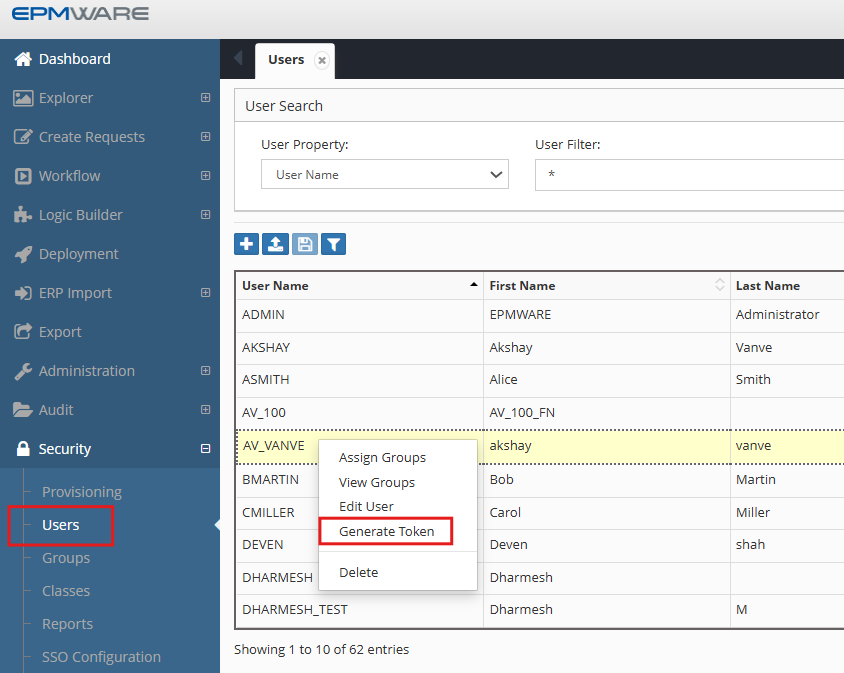
Figure: Generating an API token in EPMware
Token Format
Tokens are typically UUID format: 15388ad5-c9af-4cf3-af47-8021c1ab3fb7
Using the Token
Authentication Header
Include the token in every API request using the Authorization header:
Example
curl GET 'https://demo.epmwarecloud.com/service/api/task/get_status/244591' \
  -H 'Authorization: Token 15388ad5-c9af-4cf3-af47-8021c1ab3fb7'
Token Management
Token Lifecycle
| Aspect | Description |
|---|---|
| Generation | Created on-demand through Security Module |
| Expiration | Tokens do not expire by default |
| Revocation | Can be revoked by regenerating a new token |
| Rotation | Recommended to rotate tokens periodically |
Next Steps
Once you have successfully authenticated:
- Understand URL Structure - Learn how to construct API endpoints
- Make API Calls - Explore available API modules
- Handle Responses - Process API responses